On November 8, I wrote about what standard resolution and black-and-white faxing can and cannot do. That guide was about trade-offs you had to weigh yourself. Part of that work is now done for you: black-and-white conversion is built into SendFaxFast.
This is for anyone who just wants the fax to go out. If you are sending a medical records request, a form to the IRS or CRA, or a signed rental application, you should not have to think about grayscale, scanner settings or contrast sliders.
What happens to my document now?
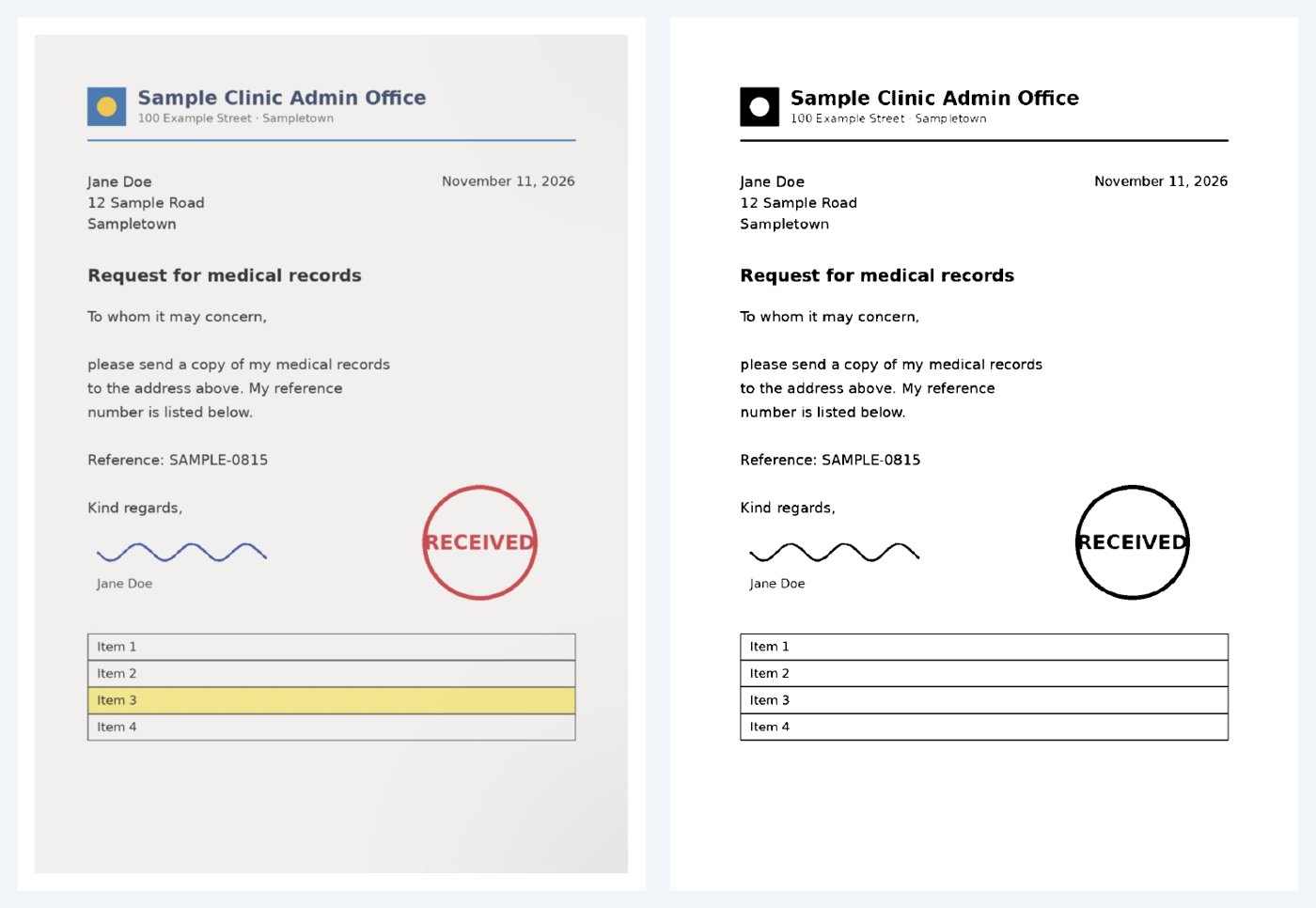
A fax machine prints in black and white only. There is no gray and no color. Until now, SendFaxFast only lightened clearly gray backgrounds. Everything else, including light gray tones and color, went into the fax as uploaded, and what happened to it was decided further down the line. Now SendFaxFast does that step itself, right after upload, following fixed rules:
- Every page is redrawn as a pure black-and-white image. Each pixel is either black or white (1-bit), with nothing in between.
- The image uses the fine fax grid of 204 × 196 dpi, so the page already has the shape a fax machine works with before it is sent.
- There is no dithering. Gray is not broken up into a dot pattern like an old newspaper photo, so text stays smooth and readable.
- The brightness of the paper is measured on every page. A gray or yellowish scan background becomes white, while the text on it stays black.
The existing check for gray backgrounds still runs first. The black-and-white conversion is an extra step on top of it.
- Since
- November 11, 2026, for all new faxes
- Applies to
- PDF, JPG and PNG uploads on the website and the AI connector
- Result
- 1-bit black and white, 204 × 196 dpi, no dithering
- Settings
- None needed, it runs automatically
- Pages and price
- Unchanged
- Original kept
- For dark photos (more than about 45% black) and when conversion is not clean
What changes for you: before and after
| Situation | Before | Now |
|---|---|---|
| Scan on gray paper | Clearly gray pages were lightened, light gray went through | Background turns white, text stays black |
| Color logo or stamp | Color was converted later on the way to the recipient | Turns solid black before sending |
| Phone photo of a letter | Gray haze often went through | Paper turns white, text stays sharp |
| Dark photo | Sent without conversion | Still sent without conversion |
| Page count and price | Counted after upload | Unchanged |
What you no longer need to do
Many people used workarounds before. You can skip them now:
- converting a file to grayscale or black and white in another app first
- turning up contrast in your scanner or scanning app
- retaking a photo because the paper looks gray
- removing a colored letterhead, or printing and rescanning a document just to fax it
Upload the file as it is.
When does SendFaxFast keep the original?
Conversion only makes sense when the result is better. So there are clear cases where SendFaxFast leaves your document alone:
- Dark photos: If more than roughly 45 percent of a page would turn black, the whole document is not converted. That covers night shots or a phone photo with a lot of dark tabletop around the paper. A hard black-and-white cut would do more harm than good there.
- Technical problems: If fonts are missing in the PDF or the page count does not match after conversion, the original is used.
In none of these cases is your fax held up. If the conversion does not work, the document is sent as usual, just without the black-and-white step.
Tip for phone photos: fill the frame with the page and crop dark edges before uploading. The conversion then works more reliably. See also how to fax a photo of a document.
What to keep an eye on
Black and white means every spot becomes either black or white. Strong colors like a red stamp or blue ink turn black. Very light colors turn white. That has two consequences:
- Yellow highlighter and pastel colors will not show up for the recipient. That was already true for fax before. Underline important parts instead.
- Faint pencil or a weak stamp may drop out. Sign with a dark pen so your signature is clearly visible.
How a fax arrives also still depends on the receiving end. A wrong number, a busy line or a machine that is switched off cannot be fixed by image conversion. If a fax does not go through, here is what to do.
Who benefits most
Doctors' offices, clinics and insurers
A medical records request or a form for a doctor or insurer often has a colored letterhead or gray form fields. These now turn into clean black and white before sending, while names, dates and signatures stay readable.
Government offices in the US, Canada, Australia, New Zealand and the UK
Government forms are often printed with shaded boxes. Whether you are faxing to a Canadian government office or an agency in Australia or New Zealand, the form now goes out with a white background and crisp text, even if you only took a photo of it.
Anyone who faxes once in a while
If you only send a fax now and then, you do not want to deal with settings. That is exactly what the conversion is for: upload, enter the number, send.
Related reading
Standard resolution and black-and-white faxing: what you gain and lose
How to fax a PDF without printing it
Frequently asked questions
Do I need to turn on black-and-white conversion?
No. Since November 11, 2026, it runs automatically on every upload. There is no setting and no extra step.
Does the conversion change the page count or the price?
No. The page count stays exactly the same, so the price stays the same. SendFaxFast checks this before replacing the file. If the page count does not match, the original is sent.
When does SendFaxFast keep my original document?
When a page is mostly dark, for example a dark photo where roughly more than 45 percent of the page would turn black. The original is also kept if the conversion runs into a technical problem, such as missing fonts in the PDF. Your fax is still sent, just without the black-and-white conversion.
What happens to color, highlighter and light pencil?
A fax only has black and white. Strong colors like a red stamp or blue ink turn black. Very light colors, yellow highlighter and faint pencil turn white and will not show up for the recipient. Underline important parts instead of highlighting them.
Does this also apply to phone photos and faxes sent from ChatGPT, Claude or Grok?
Yes. The conversion runs for PDF, JPG and PNG uploads on the website and for documents sent through the SendFaxFast AI connector.